

How Do I Stop Shoppers From Abandoning Their Cart? 12 Fixes That Work
About 70% of online carts are abandoned. Here's why shoppers leave, the 12 fixes that recover the most sales, and how to find which one your store needs first.
 Christopher Richards
November 3, 2026
Guides
Short answer: Remove surprises and remove friction. Most shoppers who abandon after deciding to buy leave for a few fixable reasons: extra costs revealed late, forced account creation, a long or broken checkout, slow delivery, or a site they don't trust.
To stop it:
Show the full price, including shipping, before checkout.
Offer guest checkout.
Cut your checkout down to the fields you actually need.
Add express payment options.
Make security and returns obvious.
Recover the shoppers who still leave with a well-timed reminder.
Start by finding out which of these is costing you sales. Then fix that one first.
The rest of this guide covers both parts: how to diagnose your store, then the 12 fixes in rough order of impact.
Is cart abandonment normal?
Yes. Some of it is unavoidable. Across 50 studies, Baymard Institute puts the average documented online cart abandonment rate at 70.22%. Roughly 7 of every 10 carts never become orders.
A large share of that is people who were never going to buy today. In Baymard's research, 42% of US shoppers who abandoned a cart were "just browsing" or not ready to buy. They use the cart as a wishlist, a price calculator, or a way to compare stores. No checkout redesign will convert all of them.
The other share is the one worth fixing: shoppers who meant to buy and were stopped by something on your site. Baymard estimates the average large e-commerce site could see a 35% increase in conversion rate from checkout design improvements alone. Your goal isn't 0% abandonment. It's getting back the buyers you're losing to fixable problems.
Don't measure success by abandonment rate alone. A discount pop-up can lower abandonment and also lower profit. Track completed orders and revenue per visitor alongside it.
Why shoppers abandon their cart
Baymard asked US shoppers who abandoned during checkout, excluding the "just browsing" group, why they left. Shoppers could choose more than one reason.
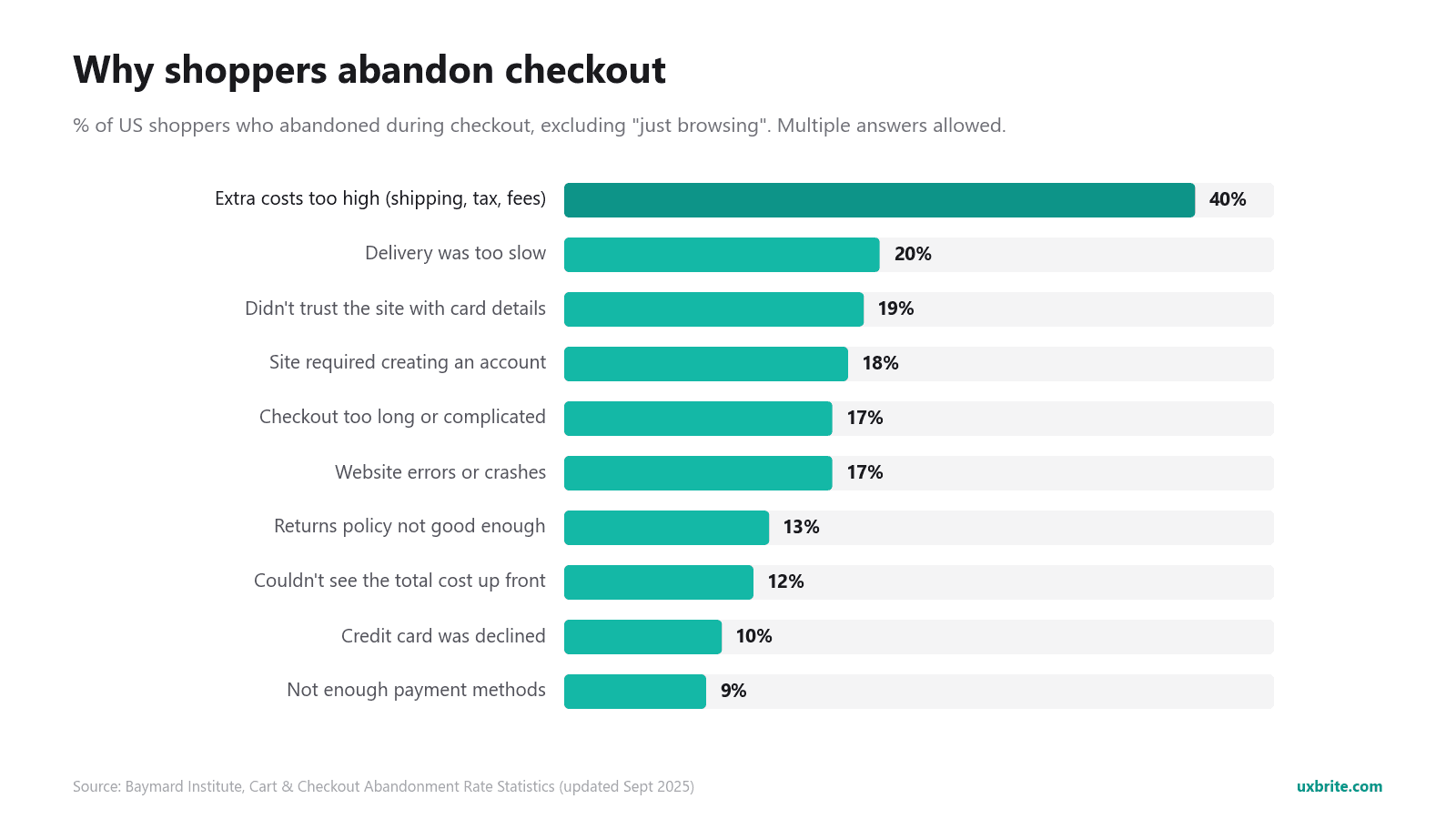
40%: extra costs (shipping, tax, fees) were too high
20%: delivery was too slow
19%: didn't trust the site with their card details
18%: the site required creating an account
17%: checkout was too long or complicated
17%: the website had errors or crashed
13%: the returns policy wasn't good enough
12%: couldn't see or calculate the total cost up front
10%: their credit card was declined
9%: not enough payment methods
Source: Baymard Institute, Cart & Checkout Abandonment Rate Statistics.
Nearly every reason on this list falls into one of three groups:
Price surprises: extra costs, a hidden total.
Friction: account creation, long checkout, errors, missing payment methods.
Doubt: trust, delivery speed, returns.
The fixes below are grouped the same way.
Step 1: Find out where your shoppers leave
Every store leaks in a different place. Industry averages tell you what's common. They don't tell you what's wrong on your site. Spend an hour on diagnosis before you change anything.
Calculate your abandonment rate. Cart abandonment rate = 1 − (completed orders ÷ carts created). Your e-commerce platform or analytics tool already tracks both numbers. Check desktop and mobile separately. A gap between them points straight at a mobile checkout problem.
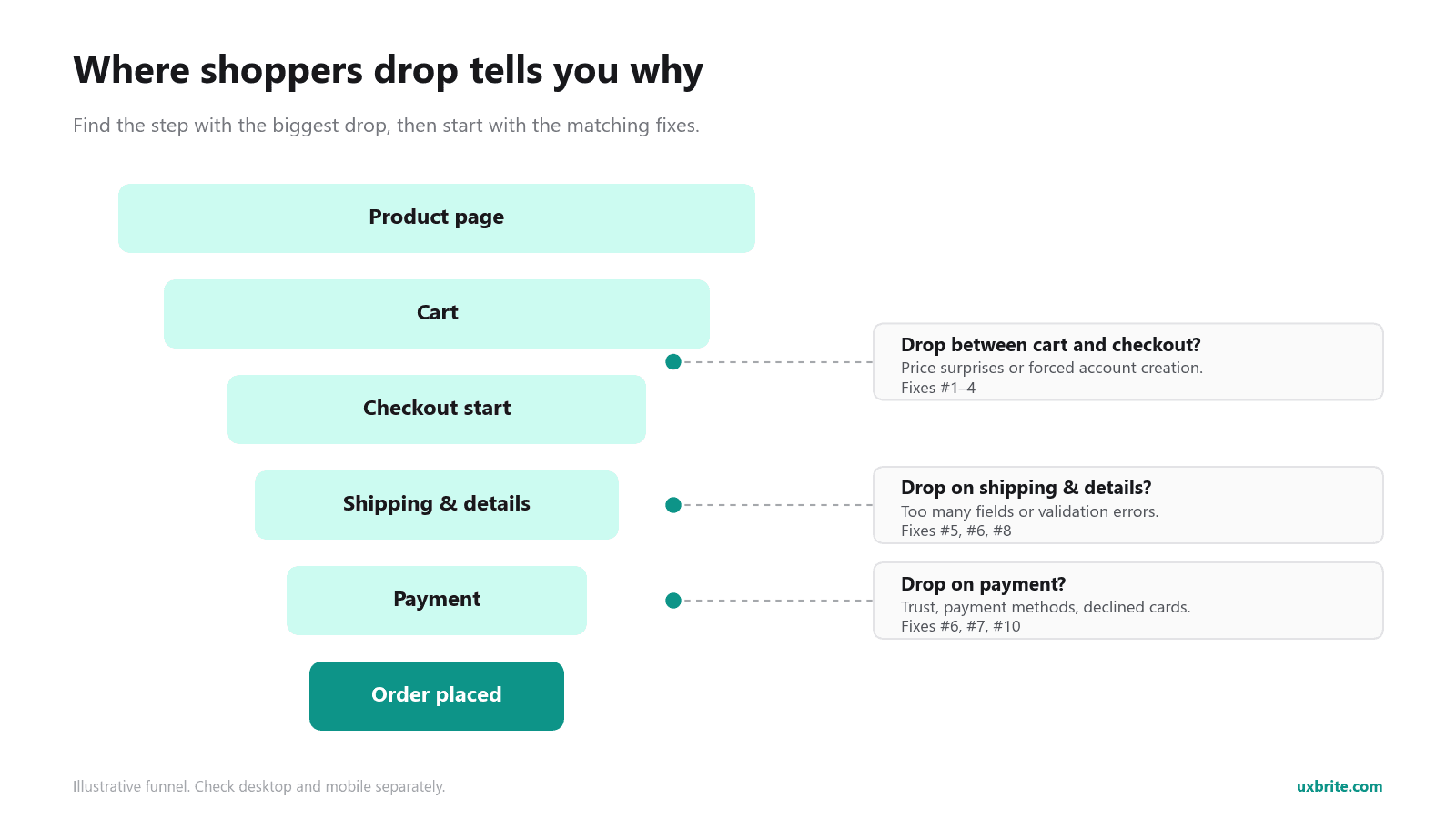
Find the step where shoppers drop. Break your funnel into stages (product page → cart → checkout start → shipping → payment → order) and see where the biggest drop is.
A big drop from cart to checkout start usually means price surprises or forced account creation.
A big drop at the payment step usually means trust, payment methods, or declined cards.
Watch real sessions. Numbers tell you where shoppers leave. Watching sessions tells you why. Session replays show a shopper re-typing a postcode three times, tapping a coupon field that does nothing, or scrolling up and down to find the shipping cost. Ten replays of abandoned sessions will usually show you a pattern you'd never spot in a report.
Tools like UX Brite put session replays, conversion goals, and on-site offers in one place. You can watch shoppers move through product pages, cart, and checkout on supported platforms, then act on what you see. Free tools like Microsoft Clarity also handle replays well if you're just starting. The tool matters less than the habit of watching sessions. Our roundup of the best session recording tools for CRO compares the options.
Write down the single biggest leak you find. That's your first fix.
Step 2: Fix price surprises
These are the biggest group. 40% of checkout abandoners cite extra costs, and another 12% couldn't see the total up front.
1. Show shipping costs before checkout
The most common reason for abandonment is a total that suddenly goes up. Show estimated shipping on the product page or in the cart, ideally with a postcode estimator. Don't wait for the shopper to enter an address on step three. If shipping depends on location, say "Shipping from $4.95" or "Free shipping over $50" next to the price.
2. Use a free-shipping threshold instead of blanket free shipping
Many stores can't afford free shipping on every order. A threshold ("Free shipping on orders over $60") turns the cost into a goal instead of a penalty. Add a progress bar in the cart: "You're $12 away from free shipping." Set the threshold a little above your current average order value so it also raises order size.
3. Make the total predictable
Taxes, duties, handling fees, and "service charges" that appear at the last step feel like a bait-and-switch, even when they're legitimate. Show them, or a clear estimate, in the cart. If you sell internationally, say up front whether duties are included.
Step 3: Remove checkout friction
4. Offer guest checkout
18% of abandoners left because the site required an account. Make guest checkout the default, or at least just as visible as signing in. Offer account creation after the order ("Save your details for next time? Just add a password"). At that point it costs the shopper nothing.
5. Cut your checkout down to the fields you actually need
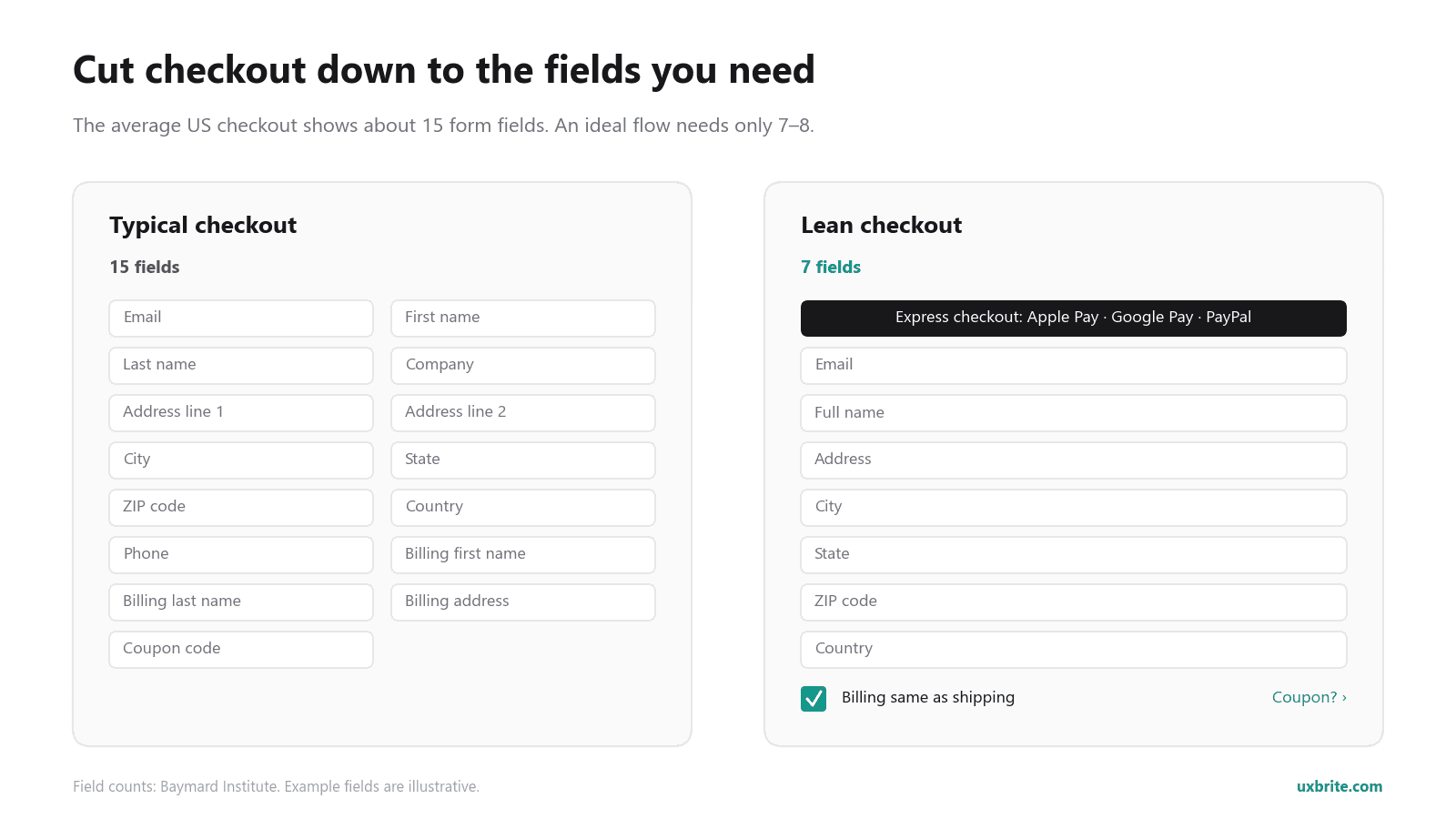
Baymard found the average US checkout shows about 15 form fields by default, while an ideal flow needs only 7–8. Common cuts:
Merge first and last name into one "Full name" field.
Hide "Address line 2" and "Company" behind a link.
Default billing address to "same as shipping."
Remove the phone number field unless your carrier requires it. If it does, say why.
Put the coupon field behind a small link so shoppers don't leave to go searching for codes.
6. Turn on autofill and express payment
Every field a shopper doesn't have to type is a chance to stay. Use correct autocomplete attributes so browsers can fill addresses and cards. Offer express wallets like Apple Pay, Google Pay, PayPal, and Shop Pay at the top of checkout and in the cart. These let a returning shopper finish in one or two taps.
7. Offer the payment methods your shoppers expect
9% of abandoners left because their preferred payment method wasn't there. Check what your audience uses. For higher-priced items, buy-now-pay-later options (Klarna, Afterpay, Affirm) can matter. For international shoppers, local methods matter more than you'd expect.
8. Find and fix checkout errors
17% of abandoners hit errors or crashes. These are the easiest fixes to justify, because the shopper wanted to buy and your site stopped them. Common problems:
Postcode or phone validation that rejects valid formats.
Error messages that say "invalid" without saying what's wrong.
Forms that clear every field after one error.
Buttons hidden behind the mobile keyboard.
Session replays filtered to sessions that started checkout but didn't finish are the fastest way to find these.
9. Make it fast, especially on mobile
Mobile is where most stores see their highest abandonment. Test your own checkout on a mid-range phone over a mobile connection, not on your office laptop. Fix slow-loading pages, tap targets that are too small, and layouts that shift while shoppers are typing.
Step 4: Remove doubt
10. Show trust signals where the card details go
19% of abandoners didn't trust the site with their card. Put reassurance next to the payment fields, not only in the footer:
Recognizable payment logos.
A short line about secure checkout.
Your returns policy in one sentence.
A way to contact you.
Product reviews and a real "About" page help earlier in the journey. Keep the checkout itself clean and consistent with the rest of your site, because a checkout that looks different from your store feels like a phishing page.
11. Be clear about delivery dates and returns
"Delivery was too slow" (20%) is often really "I didn't know when it would arrive." Show an estimated delivery date ("Arrives by Friday, Nov 13"), not "3–7 business days." Offer a faster paid option for shoppers in a hurry. State your returns policy plainly. If returns are free, say so in the cart.
Step 5: Win back the shoppers who still leave
Even a perfect checkout will lose some shoppers to distraction, price comparison, or "I'll do it later." Recovery wins back part of that group.
12. Send a well-timed abandoned-cart sequence and use on-site offers carefully
Abandoned-cart emails and SMS. If you collect an email early in checkout, most platforms (Shopify, WooCommerce, Klaviyo, Omnisend, and others) can send an automatic reminder. A common pattern:
Within about an hour: a simple reminder with a photo of the item and a one-click link back to the cart. No discount.
About 24 hours later: handle objections. Mention shipping, returns, reviews, and a way to ask a question.
About 2–3 days later (optional): a small incentive, if your margins allow it.
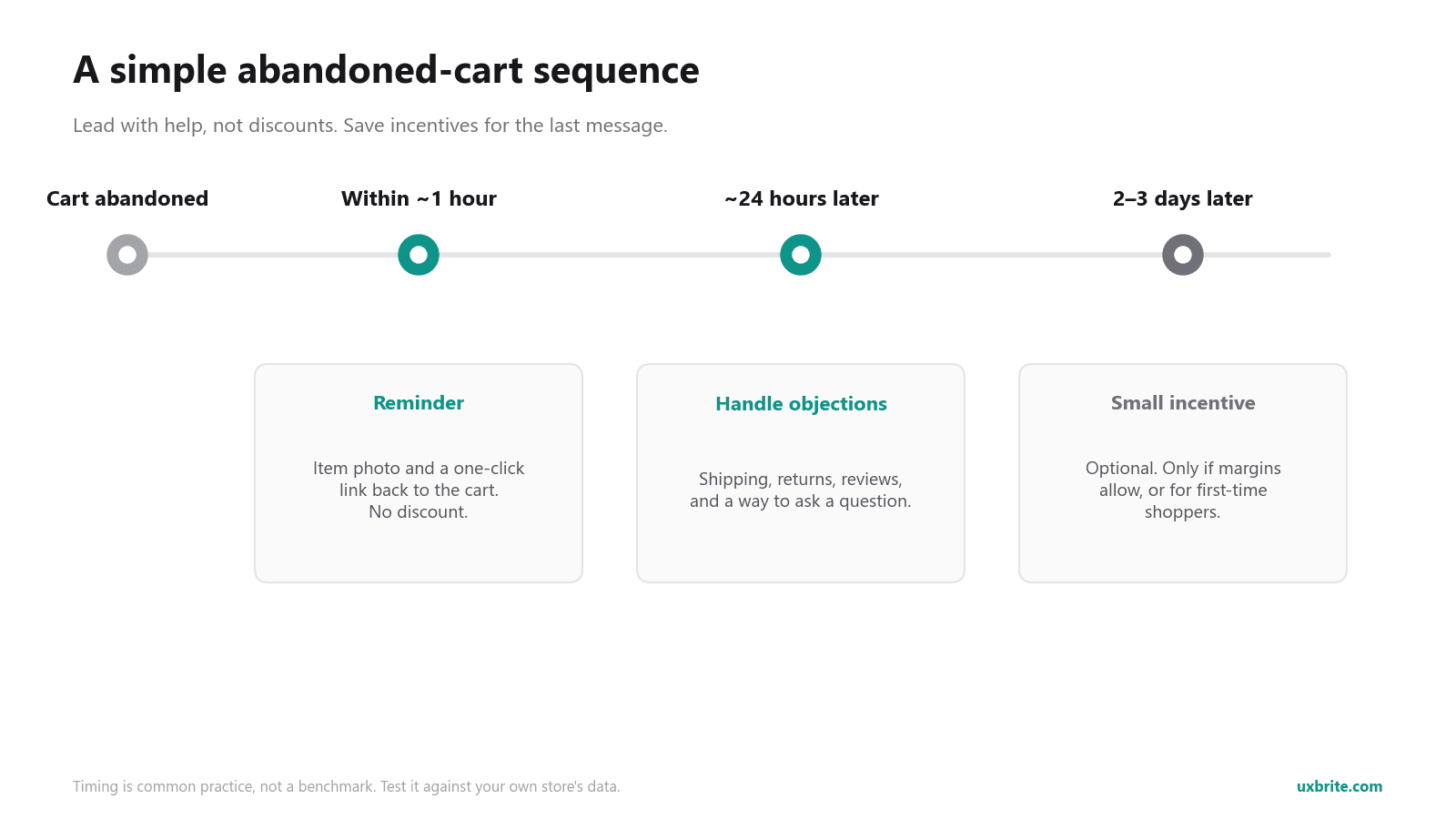
Collect the email on the first checkout step. That's what makes recovery possible at all.
Be careful with discounts. If every abandoned cart gets 15% off, regular customers learn to abandon on purpose. Save incentives for the last message, or for first-time shoppers.
On-site offers for shoppers about to leave. An exit-intent message can catch a hesitant shopper before they go. Examples are a free-shipping reminder, a returns guarantee, or a help prompt. Rotating a few offer variants and keeping the winner beats guessing. UX Brite's dynamic offers do this, and they also recognize returning customers who already exist in your store or CRM data. That way a loyal customer doesn't see the same pitch as a first-time visitor.
Retargeting ads can bring back shoppers who never gave an email. Cap how often the ads show. Seeing the same pair of shoes for three weeks hurts more than it helps.
Which fix should you do first?
Match what your data shows to where you start:
Big drop from cart to checkout: show shipping and the total early (#1–3), and offer guest checkout (#4).
Big drop on the shipping/details step: cut form fields (#5), turn on autofill (#6), and fix validation errors (#8).
Big drop on the payment step: add trust signals (#10), payment methods (#7), and express wallets (#6).
Mobile much worse than desktop: fix mobile speed and layout (#9), and add express wallets (#6).
Healthy funnel, but many "just browsing" carts: set up a recovery sequence and on-site offers (#12).
Change one thing at a time and measure completed orders before and after. Even better, A/B test it. If you change five things at once and conversions go up, you won't know which change to keep. If conversions go down, you won't know which one to undo.
Frequently asked questions
What is a good cart abandonment rate?
There's no universal "good" number. It varies by industry, device, and price point. The documented average is around 70%, so anything well below that is healthy. Compare against your own past numbers and against mobile vs. desktop, not against other stores.
What's the difference between cart abandonment and checkout abandonment?
Cart abandonment counts anyone who adds an item and doesn't buy, including people who never start checkout. Checkout abandonment counts only people who start checkout and don't finish. Checkout abandonment is usually the more fixable problem, because those shoppers have shown clear intent to buy.
Should I offer a discount in abandoned cart emails?
Not in the first message. Lead with a reminder and objection handling. Keep incentives for a later message or for first-time buyers, so regular customers don't learn to wait for a code.
Does guest checkout really make a difference?
Yes. Forced account creation is one of the most common reasons shoppers give for abandoning checkout (18% in Baymard's research). Let people buy as guests and offer an account after the order.
How long does it take to see results?
Diagnosis is fast. Watching ten abandoned sessions often surfaces a fix the same day. Fixes like showing shipping early or fixing a broken validation rule can show up in completed orders within a week or two. How fast depends on your traffic.
Can I stop all cart abandonment?
No. Many shoppers use carts to browse, compare, or save items for later. The goal is to stop losing shoppers who wanted to buy to problems you can fix.
Find your biggest checkout leak
You don't need a redesign to stop shoppers abandoning their cart. Find the one place your store loses the most buyers, fix it, measure it, and move to the next one. UX Brite shows you where shoppers drop off and why, so you know what to fix first.
Start free, with no credit card required on the free plan. Or see the full workflow in our guide to improving your checkout with UX Brite.